
AMD Radeon graphics cards are widely used for gaming, content creation, and everyday computing. From entry-level integrated GPUs to high-end discrete graphics cards, Radeon products offer strong performance, modern features, and competitive pricing.
To fully unlock their performance and maintain system stability, keeping Radeon drivers up to date is essential. Below is the most effective and beginner-friendly way to update AMD Radeon drivers, followed by an overview of Radeon models and performance optimization tips.
Update AMD Radeon Graphics Drivers First
Outdated or incorrect drivers can cause low FPS, screen flickering, crashes, or missing features. Before comparing models or tweaking performance, update your AMD Radeon driver using Driver Talent X.
Download and Install:
Click the "Download" button to download the installer. Save the setup file to your computer.
Double-click the installer and follow the on-screen instructions to complete the installation process.
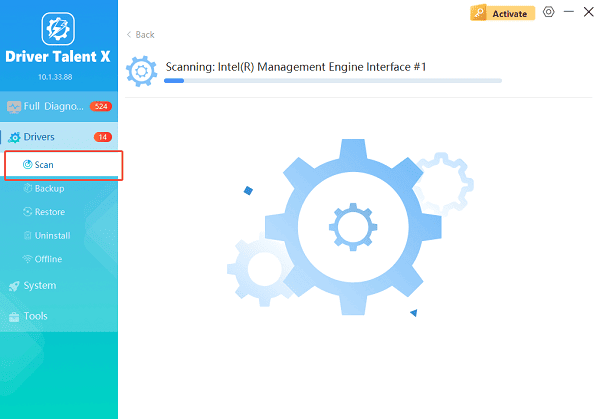
Scan Your System:
Open Driver Talent X from the desktop shortcut or the Windows Start menu, go to "Drivers" > "Scan", click "Scan".
Driver Talent X will scan for outdated, missing, or corrupted drivers, including AMD graphics drivers, chipset drivers, and system components.
Update All Drivers:
Locate AMD-related drivers in the scan results, especially graphics adapters and chipset drivers. Select the necessary drivers and click the "Upgrade" or "Repair Now" button.
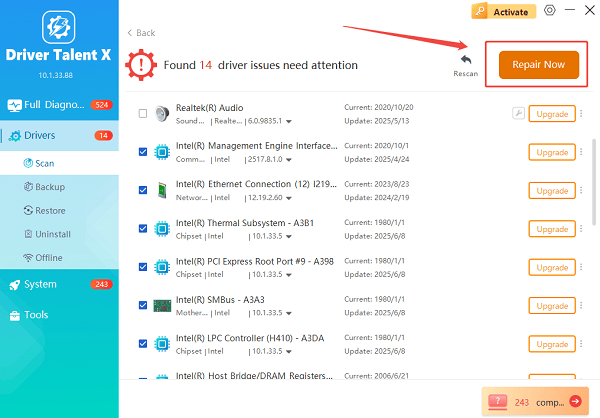
Driver Talent X will reliably download the latest drivers and execute a clean installation, critical for performance enhancements and stability fixes.
Restart your computer:
Reboot your system to ensure the new driver is fully applied and working correctly.
Updating drivers first ensures accurate performance benchmarking and prevents software-related issues.
Overview of AMD Radeon Graphics Card Models
AMD Radeon GPUs are divided into several categories based on performance level and use case.
Integrated Radeon Graphics:
Found in AMD Ryzen processors with Radeon Graphics
Suitable for office work, video playback, and light gaming
Popular models include Radeon Vega and Radeon 610M series

Entry-Level Discrete GPUs:
Designed for casual gaming and multimedia
Examples: Radeon RX 6400, RX 6500 XT
Good for 1080p gaming at medium settings
Mid-Range Radeon Graphics Cards:
Balanced performance and price
Examples: Radeon RX 6600, RX 6700 XT
Excellent for 1080p and 1440p gaming
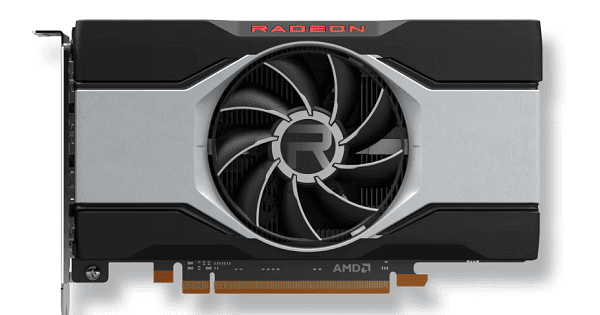
High-End Radeon Graphics Cards:
Built for demanding games and creative workloads
Examples: Radeon RX 6800 XT, RX 6900 XT, RX 7900 XTX
Support ray tracing, high refresh rates, and 4K gaming
AMD Radeon Graphics Performance Highlights
AMD Radeon cards are known for strong rasterization performance and efficient memory usage.
Smart Access Memory improves CPU-GPU communication on supported systems.
FSR (FidelityFX Super Resolution) boosts FPS without significant quality loss.
Ray tracing support available on RX 6000 and RX 7000 series.
Excellent multi-monitor and high-resolution support.
Performance varies by model, driver version, and system configuration, which is why driver updates are critical.
Additional Ways to Optimize AMD Radeon Performance
Update AMD Software Adrenalin:
Ensure the Radeon Software Adrenalin Edition is updated for better game profiles and stability.
Adjust Radeon Graphics Settings:
Open AMD Software.
Enable "Radeon Anti-Lag" for competitive gaming.
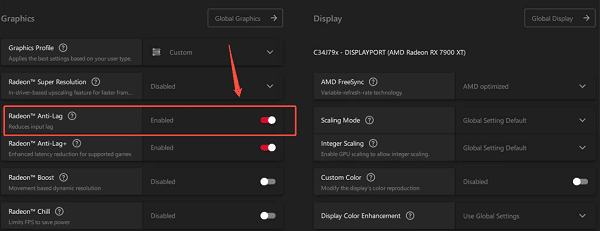
Use Radeon Chill to balance power and performance.
Keep Windows Updated:
Windows updates often include display compatibility fixes and performance improvements.
Monitor Temperatures and Power:
Overheating or insufficient power supply can throttle GPU performance. Ensure proper cooling and a suitable PSU.
Common Issues Fixed by Updating Radeon Drivers
Low FPS or stuttering in games.
Black screen or screen flickering.
Driver timeout or crash errors.
Missing resolution or refresh rate options.
Poor performance after Windows updates.
Driver Talent X helps prevent these issues by installing stable and compatible drivers automatically.
Conclusion
AMD Radeon graphics cards offer a wide range of models to suit different needs, from basic productivity to high-end gaming and professional workloads. However, performance and stability depend heavily on proper driver management. Updating your AMD Radeon graphics driver with Driver Talent X should always be the first step before evaluating performance or troubleshooting issues. Once your drivers are up to date, you can fully enjoy the power and features that AMD Radeon GPUs provide.
See also:
How to Fix CoD Vanguard Not Launching on PC
How to Resolve Crashing Issues in Warframe









