
Keeping your Lenovo WiFi drivers updated is essential to ensure a stable wireless connection on Windows 11. Outdated or missing WiFi drivers can cause issues such as slow speed, frequent disconnections, or even no WiFi option appearing at all. This guide will walk you through every safe and effective method to download and install Lenovo WiFi drivers for Windows 11, even if your device currently has no internet access.
Method 1: Automatically Download Lenovo WiFi Drivers
If you want the fastest and most convenient way to install or update your Lenovo WiFi driver on Windows 11, Driver Talent X offers an efficient automated solution. Instead of manually searching for the correct driver, the software scans your system, identifies the exact wireless adapter model, and downloads the appropriate driver version for you.
Download and Install Driver Talent X
Click the Download button to get the Driver Talent X installer.
Once downloaded, run the setup file and follow the on-screen steps to complete the installation.
Run a Full Driver Scan
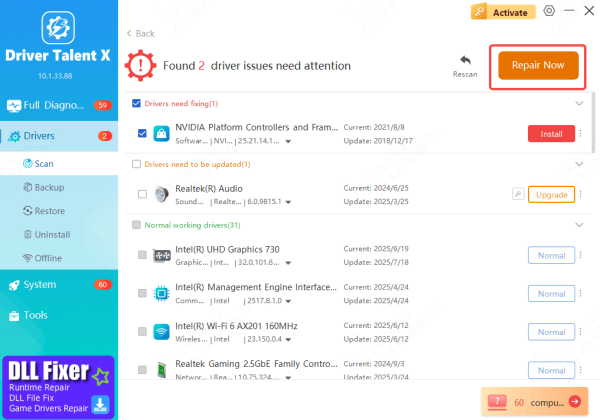
Launch Driver Talent X and go to the Drivers section
Click Scan to allow the tool to check your Lenovo laptop for outdated, missing, or corrupted drivers—including the WiFi driver

Update Your Lenovo WiFi Driver
After scanning, Driver Talent X will show all detected driver issues
Find the WiFi Network Adapter in the list, then click Upgrade or Repair Now to automatically download and install the correct Windows 11 WiFi driver for your Lenovo device
Restart Your PC
Once the update process is complete, restart your computer
This ensures the new WiFi driver is properly applied, restoring stable and fast wireless connectivity
Method 2: Download Drivers from Lenovo Support
This is an official way to get the right driver.
Go to the official Lenovo Support website
Enter your device model into the search bar
Select Drivers & Software
Choose your OS: Windows 11
Scroll to Networking: Wireless LAN or WLAN
Download the latest driver and run the installer
Lenovo provides manufacturer-verified drivers optimized for your system, ensuring the best stability.
.png "donwload-from-lenovo-support")
Method 3: Download Drivers Using Lenovo Vantage
Lenovo Vantage is an official system management tool designed to help Lenovo users keep their devices optimized. Beyond general updates, it can automatically detect and install the correct WiFi and network drivers for your Windows 11 laptop.
Install or Open Lenovo Vantage
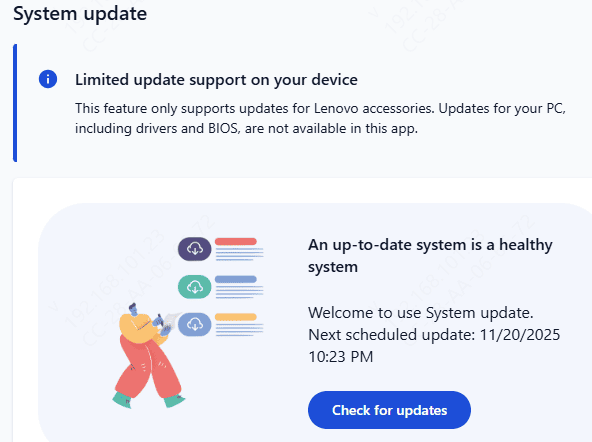
Inside Lenovo Vantage, navigate to the System Update section
Click Check for Updates to allow the tool to scan your device
Once the scan completes, Lenovo Vantage will display all available updates—including wireless network drivers, firmware, and other system components
Select any WiFi or Network Driver updates and click Install
Lenovo Vantage ensures that your device receives Lenovo-approved and fully compatible drivers, making it one of the safest ways to keep your WiFi running smoothly on Windows 11.
Method 4: Update WiFi Drivers Through Device Manager
Windows can automatically search for drivers online.
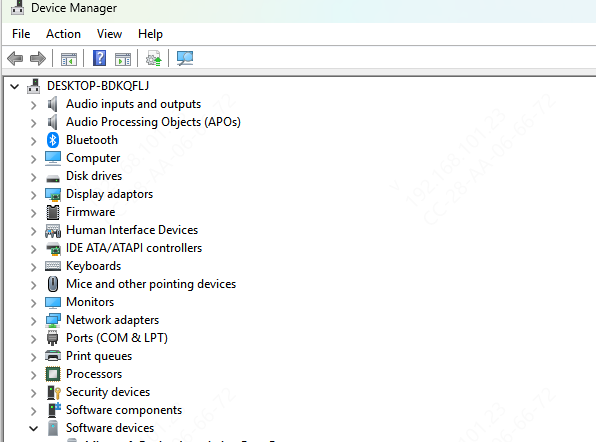
Open Device Manager
Right-click your WiFi adapter → Update driver
Select Search automatically for drivers
Follow the on-screen instructions
This method is fast but sometimes does not find the newest drivers.
Conclusion
Keeping your Lenovo WiFi drivers updated is crucial for ensuring a stable and fast wireless connection on Windows 11. Whether your WiFi is slow, unstable, or missing entirely, the methods in this guide—including using Driver Talent X, downloading drivers from the Lenovo Support website, installing updates through Lenovo Vantage, or using Windows' built-in tools—provide reliable ways to reinstall or update your WiFi driver. By choosing the method that fits your situation, you can quickly restore smooth network performance and maintain long-term system stability.









