
Keeping your Lenovo device running smoothly requires regularly updating essential drivers, such as graphics, audio, chipset, BIOS, network, and Bluetooth components. This guide explains how to access Lenovo Support, detect your device, download the right drivers, and install them properly.
Download from Lenovo Support
Accessing Lenovo Support
Begin by visiting the Lenovo Support website through your web browser
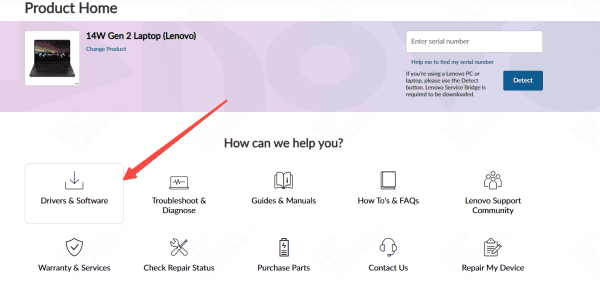
Once on the homepage, navigate to the drivers and software section, where Lenovo provides updates for all supported products
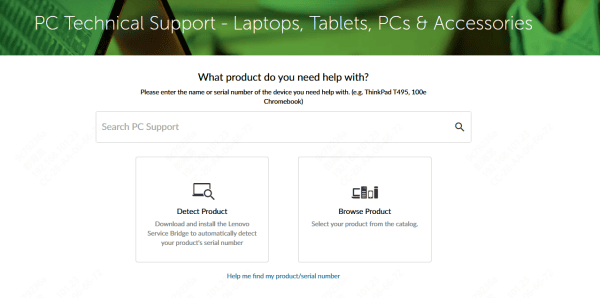
Identifying Your Lenovo Device
Another option is to use Lenovo's automatic detection feature available on the support site
You can locate your model name or serial number on the sticker at the bottom of your laptop or on the side of your desktop tower
.png "select-product")
Selecting the Correct Operating System
Lenovo provides driver packages for multiple versions of Windows, including Windows 10 and Windows 11
Selecting the correct OS version ensures you receive drivers that are fully compatible with your system environment
Downloading Lenovo Drivers
Once your model and operating system are selected, the website will display all available drivers These are grouped into categories such as chipset, display, audio, touchpad, camera, networking, BIOS, and power management
Installing the Drivers
After the download is complete, open the installer file and follow the on-screen instructions
Many drivers will guide you through a simple setup process, while others may install silently in the background
Restarting the System
Once all selected drivers have been installed, restart your computer
Rebooting allows Windows to finalize configuration changes and load the new drivers properly
Automated Driver Update with Driver Talent X
Manually searching for the correct Lenovo drivers can be time-consuming, especially when you're unsure which components need updates. Driver Talent X provides a convenient, automated way to keep your Lenovo system drivers current. It scans your device, identifies outdated or missing drivers, and installs the latest versions that match your Lenovo hardware and Windows environment.
Download Driver Talent X
Click the "Download" button to get the installation file
Once it finishes, double-click the installer and follow the simple setup steps
Run a Driver Scan
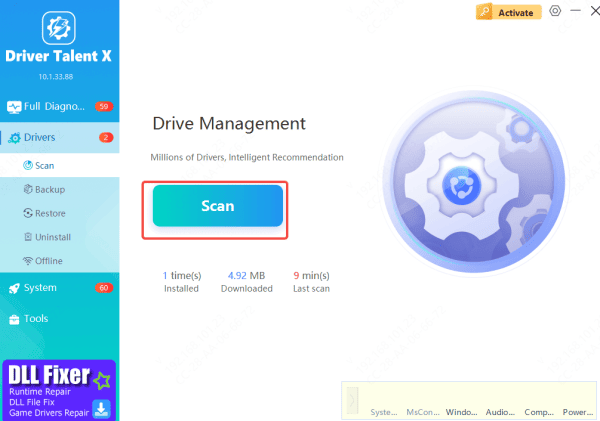
Launch Driver Talent X and go to the Drivers tab
Select Scan, and the program will analyze your system, checking every Lenovo-related component—such as graphics, USB, Thunderbolt, TouchPad, Wi-Fi, and chipset drivers
Update Required Drivers
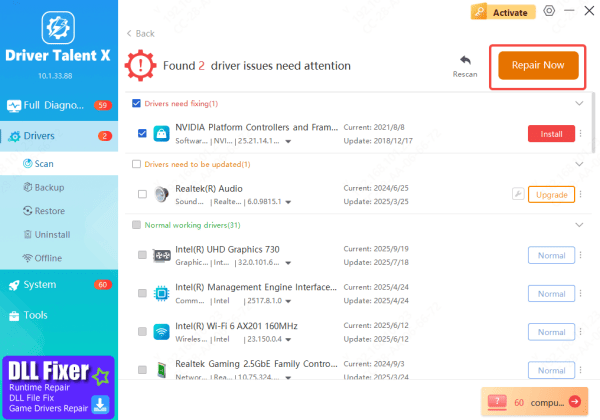
After the scan, you'll see a list of drivers that need updating or fixing
Choose the items you want to update and click Repair Now
The tool will automatically download and install the recommended drivers
Restart Your PC
Once all driver updates are complete, restart your computer
This ensures that Windows loads the new drivers properly and that your Lenovo device runs at full stability and performance
Update Through Windows Update
Windows Update is another reliable way to obtain essential Lenovo drivers when you need a quick, system-managed update method. Although it doesn't always provide the newest Lenovo-specific releases, it frequently offers Microsoft-certified versions for core components such as graphics, audio, chipset, and network adapters.
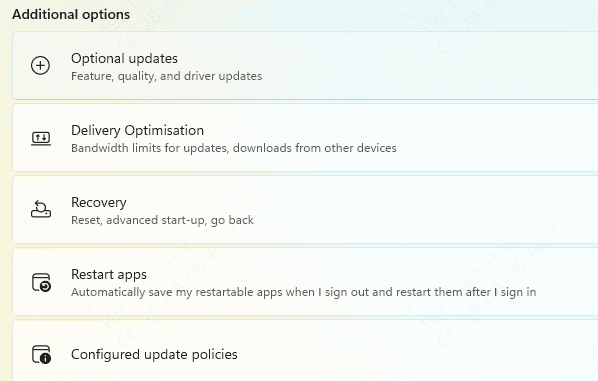
Open Settings > Windows Update
Select Check for updates
If compatible Lenovo hardware drivers are available, Windows will automatically download and install them
While this approach cannot replace the full functionality of the Lenovo Support website—especially when you need model-specific firmware, hotfixes, or dock-related updates—it serves as a convenient backup option for keeping your system stable and ensuring you have baseline driver compatibility with the latest Windows version.
Conclusion
Keeping your Lenovo system and its drivers updated is essential for ensuring smooth performance, stable hardware operation, and long-term reliability. Whether you choose to download drivers directly from the Lenovo Support website, automate the process with tools like Driver Talent X, or rely on Windows Update for quick fixes, each method plays an important role in maintaining a healthy device. Staying proactive with driver maintenance ensures your system remains secure, responsive, and fully optimized for everyday use.









