
The NVIDIA GeForce RTX 4070, built on the Ada Lovelace architecture, stands out as a high-performance graphics card designed to deliver exceptional 1440p gaming experiences. Offering a powerful combination of Ray Tracing capabilities, DLSS 3 with Frame Generation, it represents a significant upgrade for gamers looking to step into the next generation of visual fidelity without the flagship price tag.
While the RTX 4070's performance is impressive right out of the box, ensuring its drivers and supporting system components are perfectly optimized is the single most critical step to maximizing its potential and maintaining stability. This guide covers the card's specifications, performance metrics, and the essential setup required for optimal operation.
Part I: Driver Optimization and System Stability
To prevent common issues like stuttering, crashes, or underperformance with your new RTX 4070, a conflict-free driver environment is mandatory.
Automated Driver Update with Driver Talent X
Before installing the new card, or immediately after a fresh Windows installation, you must ensure your motherboard Chipset and previous GPU drivers (if applicable) are clean. A specialized utility streamlines this complex cleanup and synchronization process, guaranteeing stability for the RTX 4070.
Download and Install:
Click the "Download" button to download the software package.
Install it on your PC.
Run Scan:
Launch the application and go to "Drivers" > "Scan", click "Scan".
The software will perform a deep analysis of your system, focusing on core hardware components.
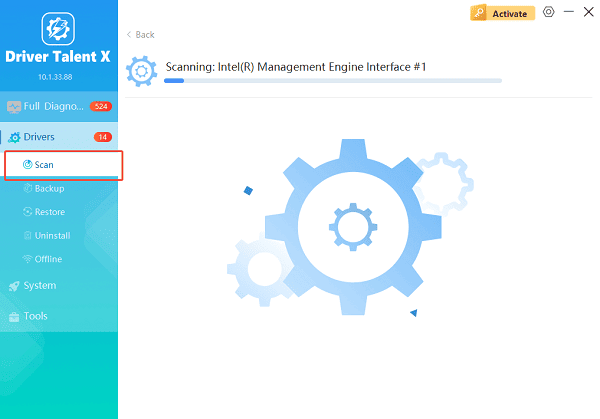
Execute Clean Update:
After the scan is complete, the software will display a list of all drivers that need attention. Select the necessary drivers (especially the Chipset and the NVIDIA driver) and click the "Upgrade" or "Repair Now" button.
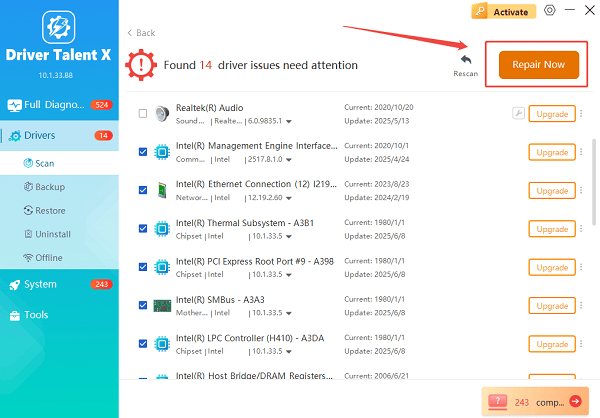
Driver Talent X will ensure the latest, certified versions are installed, crucial for the Ada Lovelace architecture.
Finalize:
After the process is complete, restart your PC to integrate the stable drivers.
Part II: NVIDIA GeForce RTX 4070 Specs & Performance Overview
The RTX 4070 is positioned as the ideal card for high-refresh-rate 1440p gaming.
Key Specifications
| Feature | Specification | Impact on Performance |
| Architecture | Ada Lovelace (AD104) | High efficiency and performance gains |
| CUDA Cores | 5,888 | Core processing power for graphics rendering |
| VRAM | 12 GB GDDR6X | Excellent capacity for 1440p textures and Ray Tracing |
| Memory Bus | 192-bit | Fast data transfer, supporting high bandwidth |
| TDP (Thermal Design Power) | 200W | Highly power efficient compared to previous generations |
Performance Benchmarks (Targeting 1440p Resolution)
The RTX 4070 consistently delivers high frame rates in modern AAA titles, particularly when leveraging DLSS 3.
| Game Title | 1440p Ultra Settings (Native FPS) | 1440p Ultra Settings (with DLSS 3/FG FPS) |
| Cyberpunk 2077 | 45-55 FPS | 90+ FPS |
| Hogwarts Legacy | 60-70 FPS | 100+ FPS |
| Forza Horizon 5 | 100+ FPS | N/A (Already high native FPS) |
Part III: Essential Optimization and Installation Checks
These steps ensure your hardware is ready and the new card is configured correctly for maximum performance.
Method 1: Verify Power Supply Unit (PSU) Requirements
Despite its high efficiency, the RTX 4070 needs adequate, stable power.
Check Requirement: The RTX 4070 typically requires a minimum 550W to 600W power supply unit.
Cable Connection: Ensure the 16-pin power connector (or the adapter provided) is securely plugged into both the GPU and the PSU. A loose connection is a major source of instability and crashes under load.
Method 2: Configure NVIDIA Control Panel Settings
Optimal performance is achieved by manually verifying key settings in the NVIDIA software.
Right-click on the desktop and select "NVIDIA Control Panel".
Go to "3D Settings" > "Manage 3D settings".
Under the "Global Settings" tab, change "Power management mode" from "Normal" to "Prefer maximum performance".
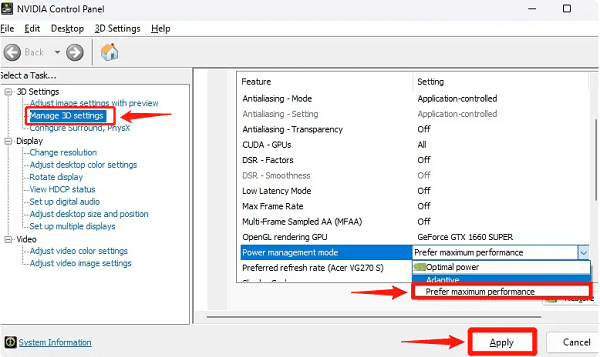
Apply the changes and restart your PC.
Method 3: Enable Resizable BAR (ReBAR)
ReBAR allows the CPU to access the entire GPU VRAM buffer at once, which can provide small but consistent performance boosts in supported games.
Check Compatibility: Ensure your CPU (Intel 10th Gen or newer / AMD Ryzen 3000 series or newer) and motherboard support ReBAR.
Enable in BIOS: Restart your PC and enter the BIOS/UEFI (usually by pressing DEL or F2). Navigate to the Advanced or PCI settings and set "Above 4G Decoding" to "Enabled" and "Resizable BAR" to "Enabled".
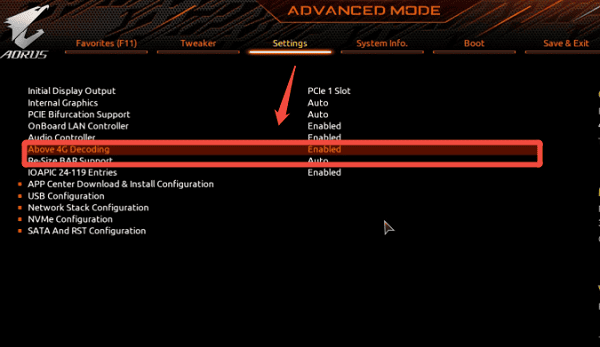
Save and exit.
Conclusion
The NVIDIA GeForce RTX 4070 is an outstanding choice for gamers seeking uncompromising 1440p performance. Maximizing its potential starts not just with the hardware, but with software integrity.
The most reliable path to stability is to first ensure system-wide driver synchronization with Driver Talent X. By combining this foundation with verifying PSU connections and enabling Resizable BAR in the BIOS, you guarantee a smooth, high-frame-rate experience that is free from frustrating driver conflicts.
See also:
Canon CanoScan LiDE 100 Not Recognized? Try These Fixes
How to Fix Knup Keyboard Connection Issues – Working Driver Solutions
Canon IR2520 UFRII LT Driver Not Recognized? Try These Fixes
Can't Print with HP LaserJet M1120 MFP? Complete Troubleshooting Guide









