
In the crowded low-profile wireless mechanical keyboard market, the Logitech G515 Lightspeed TKL (launched in 2024) remains one of the most balanced and sensible choices you can make in early 2026. It's slim, quiet, fast, and versatile enough for both serious gaming and daily office/productivity work. Here's a complete, no-fluff review based on hands-on experience and aggregated feedback from major tech outlets in 2026.
Design
The G515 uses a tenkeyless (TKL / 80%) layout: compact enough to free up desk space while still including full arrow keys, navigation cluster, and function row.
Ultra-slim 22mm height
Matte black or white finish with subtle gray accents
Double-shot PBT keycaps (durable, no shine-through over time)
Internal sound-dampening foam layers for reduced case noise and ping
.jpg "g515-keyboard")
Two-stage adjustable feet
Hidden LIGHTSPEED dongle storage compartment
1.8m braided USB-C cable included
There is no integrated wrist rest (a common point of criticism), and no dedicated volume roller or media keys — those functions are handled via the Fn layer (F9–F12 become play/pause, volume, etc.)
The all-plastic chassis has a tiny amount of flex when you really mash keys, but the dampening layers do an excellent job keeping it quiet and stable for its class
.png "keyboard-with-22mm-thin")
Switches & Typing/Gaming Experience
Logitech gave the G515 updated GL low-profile mechanical switches:
Available in Linear (Red) or Tactile (Brown)
1.3mm actuation distance, 3.2mm total travel, ~45g actuation force
Factory-lubed with POM cross-stem design for better stability and compatibility with most third-party low-profile keycaps
In real use
Very quiet typing — one of the quietest mechanical options available, perfect for shared spaces or late-night sessions
Short travel + quick response makes it excellent for fast gaming inputs (FPS, MOBAs, rhythm games)
The tactile version delivers a gentle, well-defined bump without any click noise
Review consensus (Tom's Hardware, PCMag, RTINGS, TechRadar) is that the typing and gaming feel is among the best in the low-profile category — comfortable for long workdays and responsive enough for competitive play
.jpg "quick-typing")
Performance & Connectivity
LIGHTSPEED 2.4GHz wireless with 1ms report rate and 1000Hz polling
Full tri-mode support: LIGHTSPEED, Bluetooth, wired USB-C
2:1 dongle capability (pair keyboard + one compatible mouse or headset)
Battery life: Up to 36 hours with full RGB brightness, 600+ hours with lights off — among the best in the low-profile wireless segment
Latency is virtually nonexistent for gaming, and device switching is fast and reliable. Dropouts are extremely rare even in busy 2.4GHz environments
.png "tri-connection")
Lighting & Software – Vibrant and Customizable
Per-key LIGHTSYNC RGB with 16.8 million colors, dynamic effects, game integration, and cross-device synchronization with other Logitech G products.
Logitech G HUB software provides:
Full macro recording and editing
Multiple onboard and cloud profiles
KEYCONTROL system — assign up to 15 different functions per key across layers (extremely powerful for power users, though it can feel overwhelming for beginners)
Basic lighting effects and a few profiles can be stored onboard, but the deepest customization requires the software
.png "customize-key")
Enhance Your Logitech G213 Prodigy Gaming Keyboard Experience
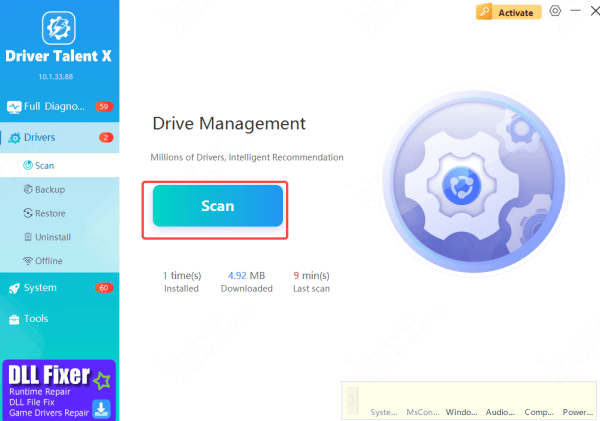
To ensure your keyboard is always performing at its best, we recommend using Driver Talent X, an easy-to-use software tool that automatically detects and updates drivers for all your peripherals, including the Logitech G213. With Driver Talent X, you can:
Automatically update drivers to ensure full compatibility with the latest gaming titles and software updates
Fix issues with peripheral devices like keyboards, mice, and even gaming headsets, all with just a few clicks
Pros & Cons
Pros
Outstanding value — delivers near-flagship performance at a much lower price
Quiet, premium-feeling low-profile typing and gaming experience
Class-leading battery life and rock-solid LIGHTSPEED wireless
Beautiful double-shot PBT keycaps and bright, even RGB
Versatile tri-mode connectivity + powerful KEYCONTROL customization
.png "lighting-function")
Cons
No dedicated volume roller or media keys (Fn-layer only)
Plastic chassis shows slight flex under very heavy typing
No included wrist rest
KEYCONTROL is complex and overkill for casual users
Not the absolute cheapest low-profile wireless option available
.jpg "logitech-g515")
Final verdict
The G515 isn't the most feature-packed or exotic low-profile board on the market — it's simply one of the most well-rounded, reliable, and satisfying options you can buy under $150 in 2026. For the majority of gamers and hybrid users, it's still an excellent pick. Highly recommended.









