Lenovo Vantage is a powerful application designed to help Lenovo users manage their devices efficiently. On Windows 11, it offers a range of features such as hardware diagnostics, battery optimization, and system personalization. Using Lenovo Vantage ensures your laptop or desktop stays up to date, secure, and running smoothly.
How to Download and Install Lenovo Vantage
Open the Microsoft Store on your Windows 11 device
Search for "Lenovo Vantage"
Click Download or Install
Once installed, launch the application for the first time
.png "download-lenovo-vantage")
Setting Up Lenovo Vantage
Once Lenovo Vantage is installed on your Windows 11 device, follow these steps to properly set it up and start using its features:
Sign In with Lenovo ID: You may sign in using your Lenovo ID to unlock full functionality, including warranty information, personalized support, and device-specific updates. If you don't have a Lenovo ID, you can create one directly within the app or skip this step for basic usage
Accept Permissions and Privacy Settings: Lenovo Vantage will request access to certain system components to provide accurate diagnostics and updates. Review and accept the privacy settings, including hardware monitoring and software update notifications
 (1).png "dashboard")
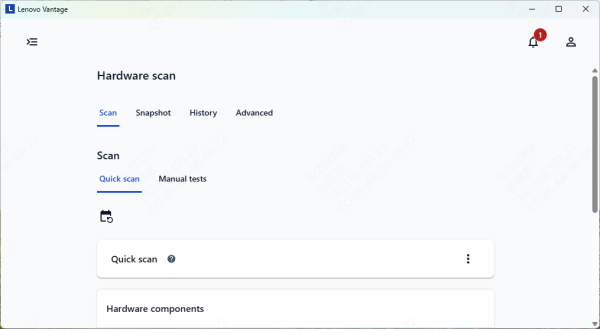
Initial Device Scan: After setup, the app will perform a quick scan of your system to detect hardware components, driver versions, firmware, and system health status. This scan helps Lenovo Vantage identify outdated drivers, firmware updates, battery status, and any potential issues that may need attention
Explore the Dashboard: Once the scan is complete, the Vantage dashboard displays an overview of your system's health, battery status, and pending updates. Navigate through the different sections such as System Update, Hardware Settings, Diagnostics, and Security & Privacy to familiarize yourself with the features
Key Features and Functionalities
Lenovo Vantage provides multiple useful tools for Windows 11 users:
Battery & Power Management: Customize battery charging modes and power settings to extend battery life
Hardware Diagnostics & Support: Detects hardware issues and offers troubleshooting or direct access to Lenovo support
Personalization: Adjust keyboard backlight, audio, and display settings.
Security & Privacy: Enable camera and microphone protections, manage device passwords, and monitor system security
Keep Your Lenovo System Drivers Updated
To ensure Lenovo Vantage runs smoothly on Windows 11 and can manage your system settings, updates, and device health efficiently, it is crucial to keep all key drivers up to date. Drivers for components such as USB ports, network adapters, graphics, and chipset are especially important. Outdated drivers can prevent Vantage from detecting hardware properly or cause errors when applying updates.
Download and Install Driver Talent X
Click the Download button to get the Driver Talent X installer
Once downloaded, run the setup file and follow the on-screen instructions to complete the installation on your Lenovo device
Run a Full System Scan
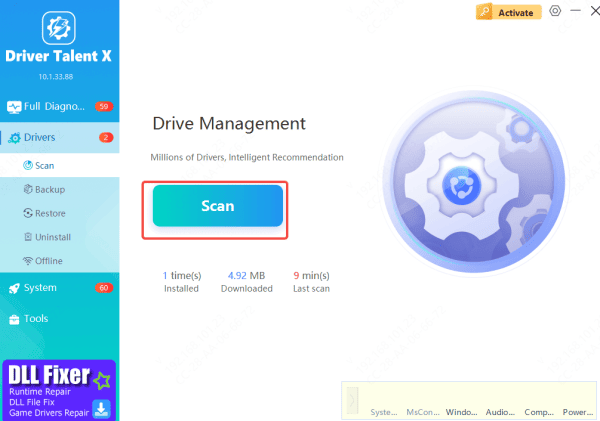
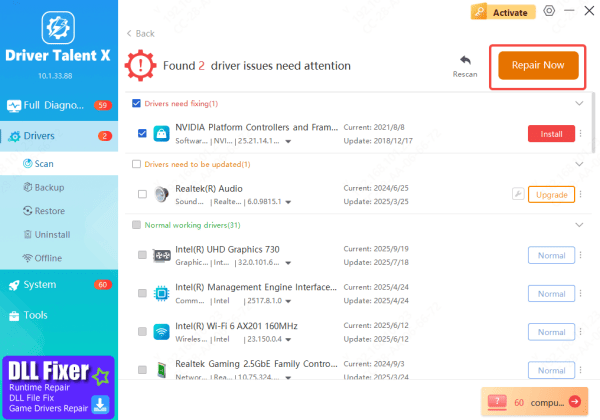
Launch Driver Talent X, go to the Drivers section, and click Scan
The software will automatically inspect your system, checking for outdated, missing, or corrupted drivers that could affect the functionality of Lenovo Vantage on Windows 11
Update All Necessary Drivers
After scanning, select Upgrade or Repair Now
Driver Talent X will automatically download and install the latest versions of all critical drivers, including graphics, USB, network, and chipset drivers
Keeping these drivers current ensures Lenovo Vantage operates properly and can manage system updates, device health, and hardware settings effectively
Restart Your PC
Once the updates are installed, restart your computer
This ensures that Windows 11 loads the new drivers correctly, allowing Lenovo Vantage to function optimally and manage your system without issues
Conclusion
Lenovo Vantage is an essential tool for Windows 11 users who want to keep their devices running smoothly, securely, and efficiently. By downloading and properly setting up the app, users can access system updates, hardware diagnostics, battery optimization, and personalization features. Ensuring that all critical drivers are up to date—using tools like Driver Talent X—further enhances Vantage's performance and reliability. Regularly maintaining your drivers and using Lenovo Vantage allows your laptop or desktop to stay fully optimized, prolong device lifespan, and prevent potential issues before they affect your workflow.









